

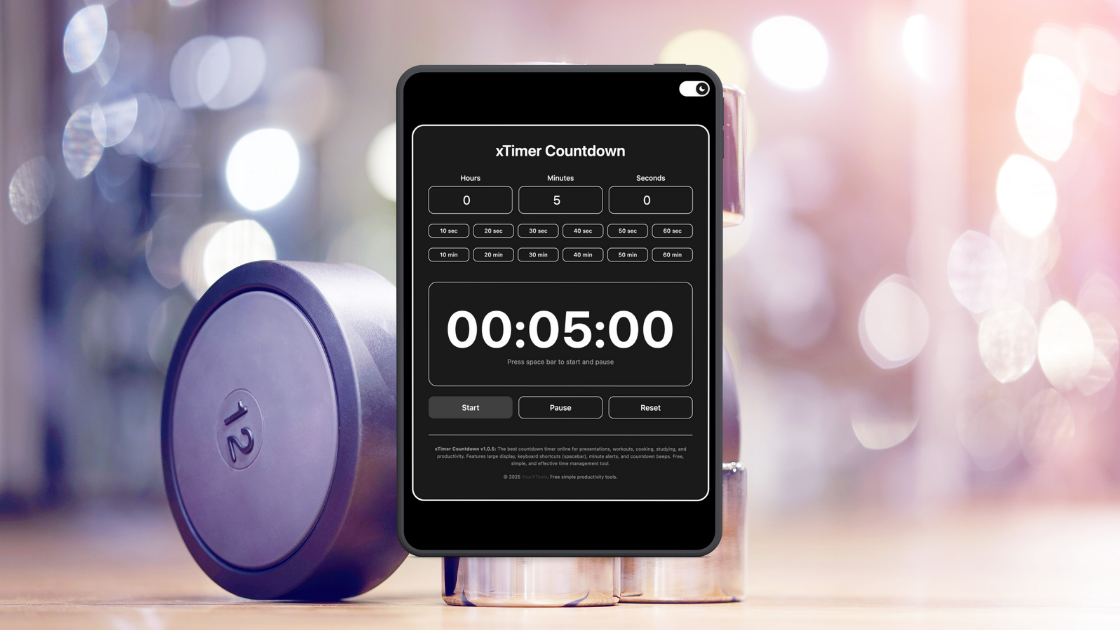
This tool helps you stay consistent with workouts by giving you ready-made seconds and minutes presets that remove friction and keep your focus on movement, not maths.
If you’ve ever started a workout only to pause and think, “Wait, how long should this interval be again?”, you’ll get why the latest xTimer update matters. I’ve used xTimer for a while for teaching and general time-keeping, but this update quietly shifts it into something even more useful: a no-nonsense workout timer that actually understands how people train.
The new seconds and minutes presets sound small on paper, but in practice, they change the whole flow. Instead of fiddling with numbers or resetting the timer after every set, you tap a preset and get straight into the exercise. That tiny reduction in friction is often the difference between staying in rhythm and breaking momentum.
Why presets matter more than you think
Most workouts live in short, repeatable time blocks. Thirty seconds on, ten seconds rest. One minute plank. Two minutes recovery. These are familiar patterns, yet many timers still expect you to manually dial them in every single time. xTimer’s update recognises that reality. The seconds presets are perfect for HIIT, circuits, Tabata-style sessions, or quick mobility drills. The minutes presets fit strength training rests, steady cardio, stretching, or cooldowns.
What I like is how natural it feels. You’re not configuring a “workout mode” or navigating a fitness app dashboard. You’re simply choosing time, quickly, and moving on. It keeps the tool feeling light and flexible rather than turning it into something over-engineered.
Using xTimer during real workouts
In home workouts, xTimer shines because it doesn’t demand attention. You set a 30-second preset for squats, hear the alert, tap a 15-second rest, and continue. No downloads, no sign-ins, no pop-ups pulling you out of the session. On a phone or tablet, it’s especially convenient, sitting there quietly doing its job.
In group settings, the presets are just as handy. Trainers running small classes or PE teachers managing stations can switch intervals instantly without stopping the activity. Everyone can see or hear the timer, and there’s no confusion about how much time is left. That clarity reduces hesitation and keeps energy levels up.
Even outside intense workouts, the minutes presets are useful for stretching routines, yoga holds, or rehabilitation exercises where timing matters but complexity doesn’t. The timer adapts to the pace of the session instead of forcing you to adapt to it.
Simplicity over smart features
There’s a reason many people still prefer simple timers over full fitness apps. When you’re mid-workout, you don’t want graphs, achievements, or notifications. You want accuracy, speed, and reliability. xTimer keeps that balance well. The update adds convenience without clutter, which is harder to pull off than it sounds.
It’s also refreshingly bias-free. The timer doesn’t judge, track, or analyse. It simply counts down. That makes it useful for beginners who don’t want pressure, and for experienced users who already know what they need.
A small update with everyday impact
What stands out most is how the update fits into daily habits. You don’t have to “learn” it. The presets feel obvious, almost like they should have always been there. Whether you’re squeezing in a quick workout between meetings, running a structured training session, or just timing rest intervals, xTimer now feels even more aligned with real use.
In the end, xTimer remains what it has always been: a simple online timer. The difference is that with the new seconds and minutes presets, it quietly becomes a dependable workout companion. Not flashy, not loud, just consistently helpful when timing actually matters.

Leave a Reply